
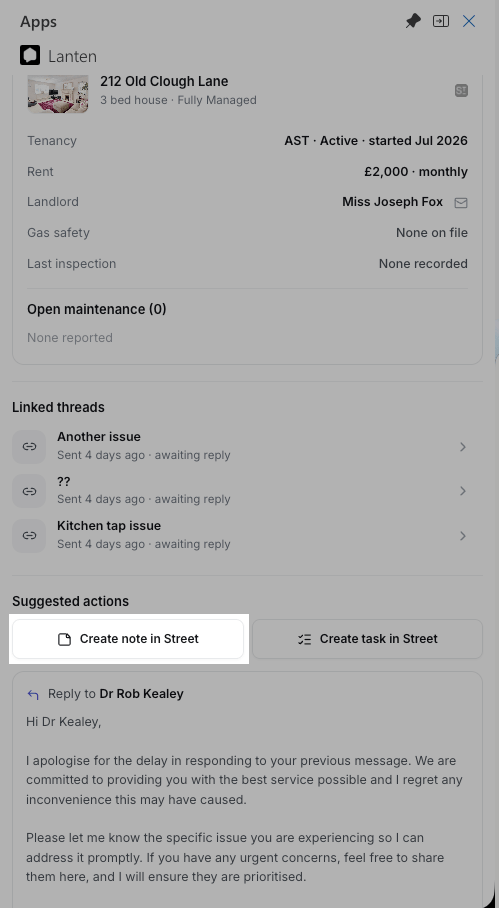
Both actions sit under Suggested actions on every email.
First time only: pick yourself from the Author (notes) or Assignee (tasks) list — that’s how the record is attributed in Street. Lanten remembers your choice and defaults to it from then on.
Create a note in Street
Use it when the email contains something worth keeping on the record: a tenant’s new phone number, a landlord agreeing to a spend, a warning sign you want the next person to see.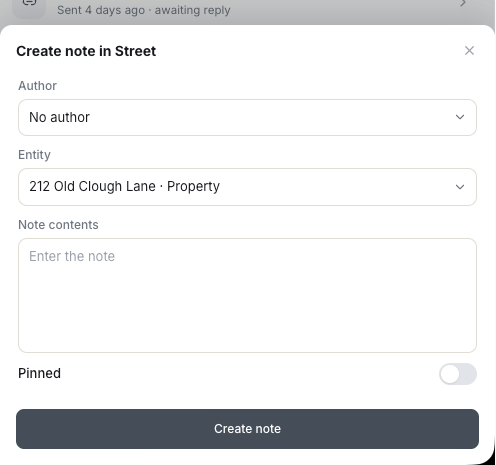
Author, entity, contents — and pin it if it should sit at the top of the record.
1
Click Create note in Street
The form opens in the panel.
2
Check the details
Entity is pre-set to whatever the email matched — the tenant, property or landlord the note belongs against in Street; switch it if it belongs somewhere else. Write the note contents, and toggle Pinned if it should sit at the top of the record.
3
Create note
It appears on that record in Street immediately.
Create a task in Street
Use it when the email creates a to-do: chase the gas certificate, book the inspection, call the landlord back Friday.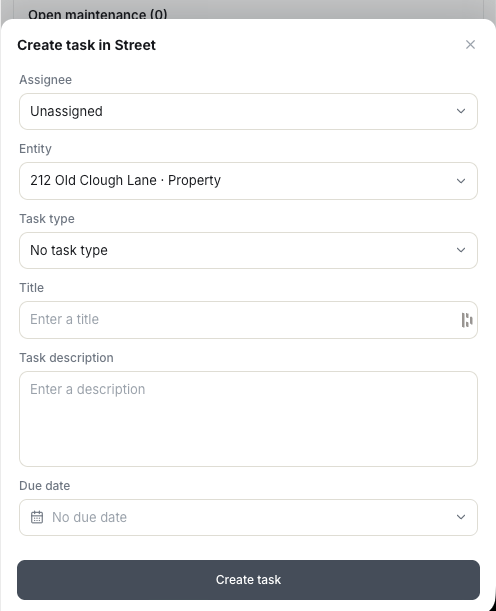
Assignee, entity, one of your Street task types, and a due date.
1
Click Create task in Street
The form opens in the panel.
2
Fill it in
Entity is pre-set to the record the email matched. Pick a task type — the list comes straight from your Street task types — then add a title, description and due date.
3
Create task
The task lands in Street’s task list, assigned and dated.