> ## Documentation Index
> Fetch the complete documentation index at: https://help.lanten.ai/llms.txt
> Use this file to discover all available pages before exploring further.
# Tags
> Describe a tag in plain English and Lanten's AI applies it to incoming email — as Outlook categories, right in your normal inbox.
Tags let you organise the inbox by what emails *are* — complaints, urgent requests, high-value landlords — without moving anything anywhere. You describe each tag in plain English; the AI checks every incoming email against your descriptions and applies the ones that fit.
Under the hood, tags are **Outlook categories**: they show as colours in your message list, they're filterable, and they sync everywhere your mailbox does — including your phone.
## Creating a Tag
Tags are managed in the dashboard: [app.lanten.ai](https://app.lanten.ai) → **Tags**.
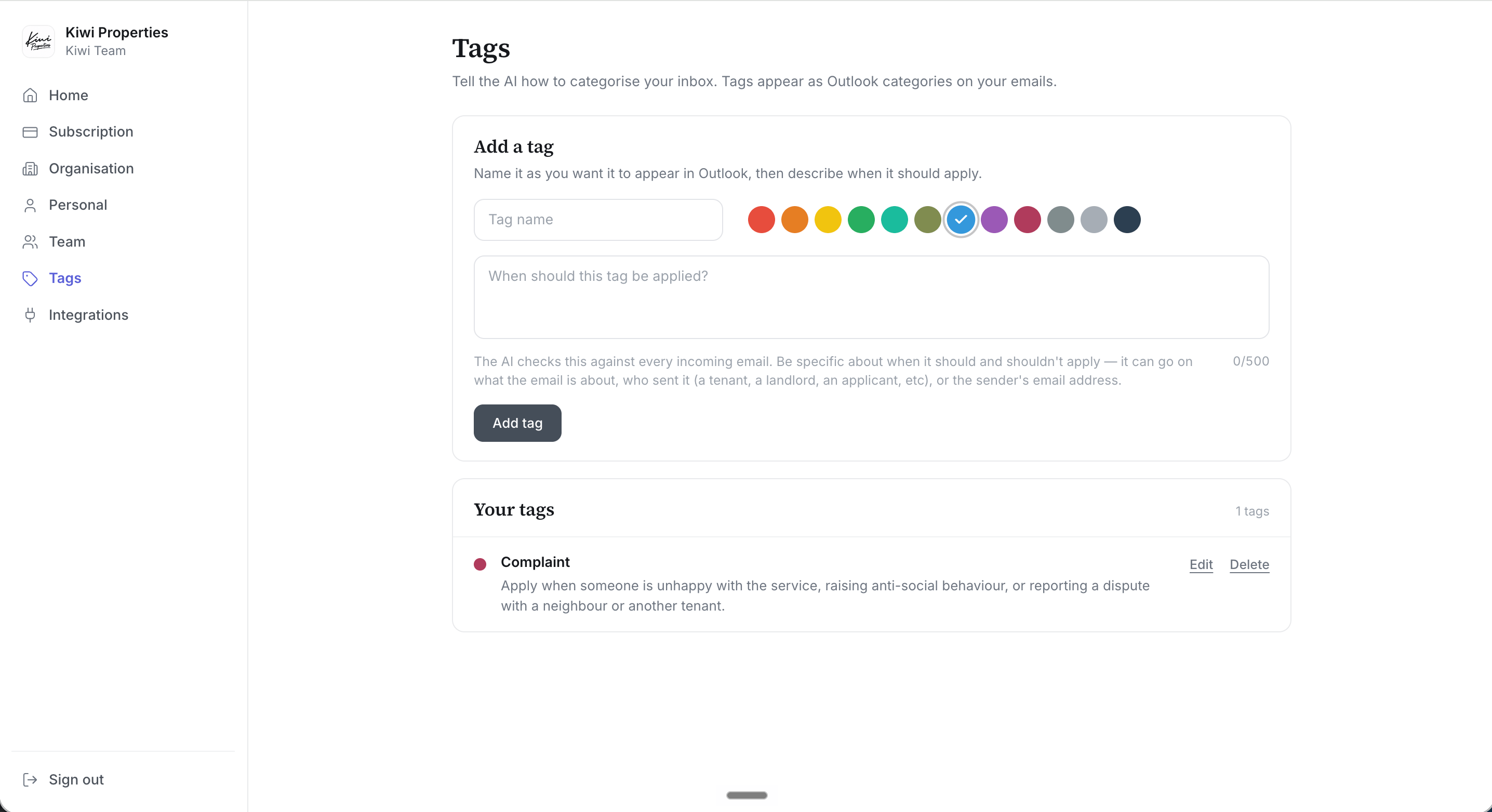 1. **Name** the tag as you want it to appear in Outlook.
2. Pick a **colour** — this becomes the category colour in your inbox.
3. Describe **when it should be applied**, in up to 500 characters.
The description is the whole game. The AI checks it against every incoming email, so be specific about when it *should and shouldn't* apply — you can reference what the email is about, who sent it (a tenant, a landlord, an applicant), or even the sender's email address.
Write the description like you'd brief a new starter. The built-in example is the pattern to copy:
**Complaint** — *"Apply when someone is unhappy with the service, raising anti-social behaviour, or reporting a dispute with a neighbour or another tenant."*
## What gets tagged
* Tags apply to **new email arriving after the tag exists** — Lanten doesn't backfill your history.
* Wrong call? Add or remove the category on any email in Outlook as normal. Corrections don't retrain the AI — if a tag keeps misfiring, **sharpen its description** instead; that's the lever.
## Finding tagged emails
Tagged emails show their colours in the message list. From there, Outlook's own machinery does the work: filter the inbox by category, click a category to see everything carrying it, or save a category search.
The best trick: **add the tag to Outlook's Favourites**. In the folder pane, add a favourite, search the tag's name, and select it.
1. **Name** the tag as you want it to appear in Outlook.
2. Pick a **colour** — this becomes the category colour in your inbox.
3. Describe **when it should be applied**, in up to 500 characters.
The description is the whole game. The AI checks it against every incoming email, so be specific about when it *should and shouldn't* apply — you can reference what the email is about, who sent it (a tenant, a landlord, an applicant), or even the sender's email address.
Write the description like you'd brief a new starter. The built-in example is the pattern to copy:
**Complaint** — *"Apply when someone is unhappy with the service, raising anti-social behaviour, or reporting a dispute with a neighbour or another tenant."*
## What gets tagged
* Tags apply to **new email arriving after the tag exists** — Lanten doesn't backfill your history.
* Wrong call? Add or remove the category on any email in Outlook as normal. Corrections don't retrain the AI — if a tag keeps misfiring, **sharpen its description** instead; that's the lever.
## Finding tagged emails
Tagged emails show their colours in the message list. From there, Outlook's own machinery does the work: filter the inbox by category, click a category to see everything carrying it, or save a category search.
The best trick: **add the tag to Outlook's Favourites**. In the folder pane, add a favourite, search the tag's name, and select it.
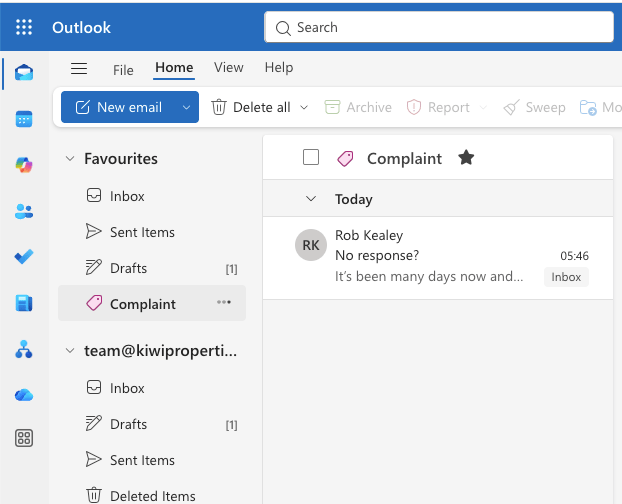
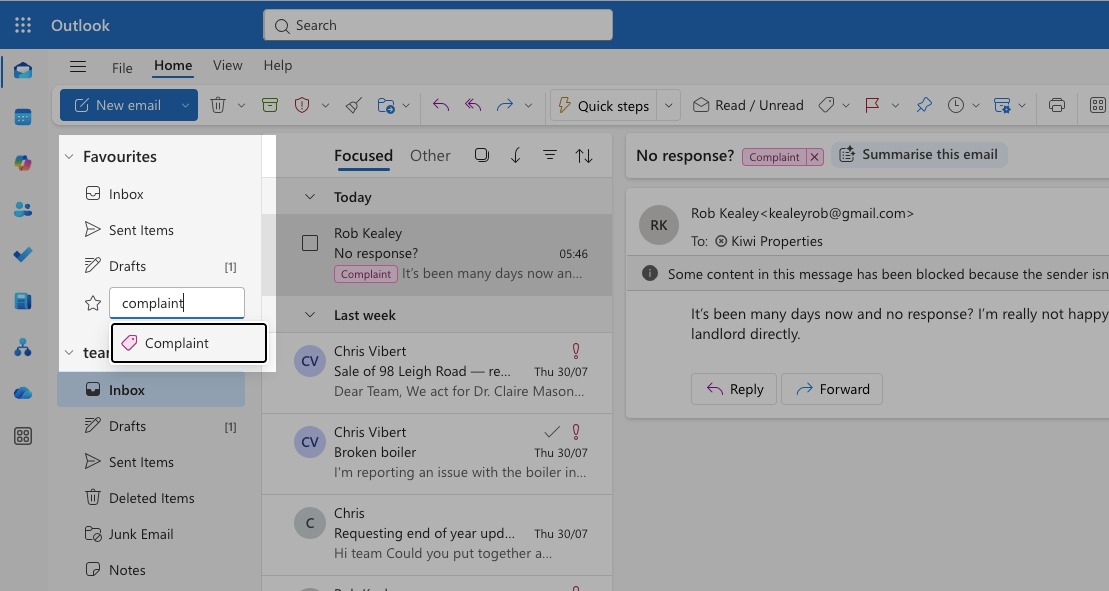 The tag pins to Favourites like a folder — one click shows every email carrying it, while everything stays right where it was in your inbox.
 ## Tags vs separate inboxes
The old way to organise a lettings inbox is more inboxes: maintenance@, accounts@, complaints@ — each one a place for things to be forwarded to, lost in, and double-answered from.
Tags are the alternative: **one inbox, many views**. The same email can be `Maintenance` *and* `Urgent` *and* `High-value landlord` at once — no forwarding, no "who's got this?", full thread history intact. Ideas that work well:
* **Urgent requests** — anything needing same-day action
* **Complaints** — service issues, disputes, anti-social behaviour
* **High-value landlords** — your top clients, by name or address if you like
* **Compliance** — gas certificates, EICRs, licensing
Running a genuinely shared mailbox as well? See [Shared inboxes](/outlook/shared-inboxes).
## Tags vs separate inboxes
The old way to organise a lettings inbox is more inboxes: maintenance@, accounts@, complaints@ — each one a place for things to be forwarded to, lost in, and double-answered from.
Tags are the alternative: **one inbox, many views**. The same email can be `Maintenance` *and* `Urgent` *and* `High-value landlord` at once — no forwarding, no "who's got this?", full thread history intact. Ideas that work well:
* **Urgent requests** — anything needing same-day action
* **Complaints** — service issues, disputes, anti-social behaviour
* **High-value landlords** — your top clients, by name or address if you like
* **Compliance** — gas certificates, EICRs, licensing
Running a genuinely shared mailbox as well? See [Shared inboxes](/outlook/shared-inboxes).