> ## Documentation Index
> Fetch the complete documentation index at: https://help.lanten.ai/llms.txt
> Use this file to discover all available pages before exploring further.
# Syncing emails to Street
> Automatically log the emails your team sends and receives against the matching Street records — switched on per inbox, configured once for your agency.
Email sync logs your team's emails to Street for you. When someone sends or receives an email, Lanten matches it to the relevant Street records and writes it up as a note there — no copy-paste, and nothing slips because a colleague forgot to log it. It's the always-on companion to the manual [Create note action](/using-lanten/tasks-and-notes).
Two switches control it, both on the Integrations page at [app.lanten.ai](https://app.lanten.ai):
* **Street sync** — turned on per inbox, by each teammate.
* **Email sync** — which record types emails are logged against, set once for the whole agency.
## Turn it on for an inbox
Email sync stays off until you switch it on for a connected inbox. Each teammate connects their own Outlook (see [Connecting Outlook](/setup/connect-outlook)), so each person turns on their own sync.
Go to [app.lanten.ai](https://app.lanten.ai) → **Integrations**. On your **Outlook** card, flip **Street sync** on.
 From that moment, emails on that inbox start logging to Street. Turn it off any time from the same toggle.
Street sync is **per inbox** — switching it on for your account doesn't touch anyone else's. Every teammate who wants their emails logged flips their own toggle.
## Choose which records get logged
By default, synced emails are logged against every kind of Street record. If you'd rather narrow that down, do it once for the whole agency.
On the Integrations page, open **Advanced settings** on the **Street** card and find **Email sync** — *"Which Street records synced emails are logged against, for inboxes with Street sync turned on."* Toggle any record type on or off:
From that moment, emails on that inbox start logging to Street. Turn it off any time from the same toggle.
Street sync is **per inbox** — switching it on for your account doesn't touch anyone else's. Every teammate who wants their emails logged flips their own toggle.
## Choose which records get logged
By default, synced emails are logged against every kind of Street record. If you'd rather narrow that down, do it once for the whole agency.
On the Integrations page, open **Advanced settings** on the **Street** card and find **Email sync** — *"Which Street records synced emails are logged against, for inboxes with Street sync turned on."* Toggle any record type on or off:
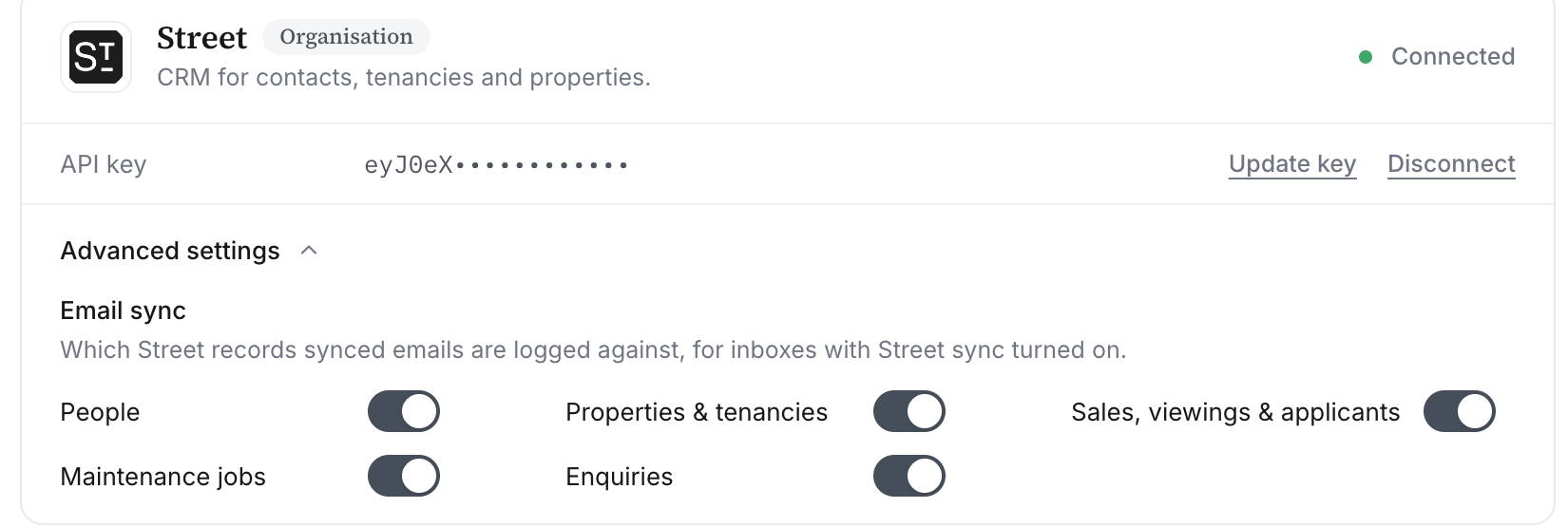 * **People**
* **Properties & tenancies**
* **Sales, viewings & applicants**
* **Maintenance jobs**
* **Enquiries**
These settings are organisation-wide: they apply to every inbox that has Street sync turned on.
## How matching works
Lanten matches each email to Street records by the addresses on it — the same matching that powers the [sender's record card](/using-lanten/street-records). One email can be logged against more than one record: a tenant's maintenance email can land on both the tenant and the property.
Email sync and manual notes work together. Let sync capture the running history in the background, and use [Create note](/using-lanten/tasks-and-notes) when you want to write a specific, pinned note in your own words.
* **People**
* **Properties & tenancies**
* **Sales, viewings & applicants**
* **Maintenance jobs**
* **Enquiries**
These settings are organisation-wide: they apply to every inbox that has Street sync turned on.
## How matching works
Lanten matches each email to Street records by the addresses on it — the same matching that powers the [sender's record card](/using-lanten/street-records). One email can be logged against more than one record: a tenant's maintenance email can land on both the tenant and the property.
Email sync and manual notes work together. Let sync capture the running history in the background, and use [Create note](/using-lanten/tasks-and-notes) when you want to write a specific, pinned note in your own words.